Sunday, January 29, 2017

Diamond Price Modeling


Princess Cut Model and Methodology


While researching whether it was possible to scrape diamond price database info from BlueNile, I came across this excellent post. A. Marder wrote a nice script to query BlueNile and report the data in CSV format for further analysis.

Diamond Grading Basics

The most common grading parameters for diamonds are the "four C's":
: Color (how close to colorless)
: Clarity (lack of physical crystal defects/inclusions)
: Cut (quality of the resulting refraction/sparkle)
: Carat (weight of the stone - related to diameter/size)

See the Gemological Institute of America's guide for details on the particular grading parameters.

A side-note, make sure to view a few samples of different colors/clarities before purchasing as you may find there to be very little difference in "lower quality" gems vs. the price.

Data Scraping

I use A. Marder's Python script to scrape price data from BlueNile, one of the main online diamond retailers.

I used the Windows 10 beta Ubuntu bash shell to install and run the script using the following commands:

Installed GIT to allow for easy installation from A. Marder's repository
 sudo apt install git  

Installed python-dev for some needed setup dependencies
 sudo apt install python-dev  

Needed to do upgrade/update to make sure packages were at their latest version
 sudo apt upgrade  
 sudo apt update  

Needed to force pip to upgrade virtualenv to mitigate some other errors
 sudo pip install --upgrade virtualenv

Installed iterdata scraping script by A. Marder from GIT repository
 pip install git+https://github.com/amarder/iterdata.git 

Lastly I created the following shell script (scriptname.sh) to perform the database scraping:

 echo "BlueNile Scraping Started..."  
 datapipe read_bluenile --pause 10 --min-carat 0.5 --max-carat 1.5 -- shape PR \  
 limit --count 10000 \  
 write_csv --path diamonds.csv  

Execute the script with 
 ./scriptname.sh  

--pause adjusts the time between queries to avoid hammering BlueNile's site
--min-carat and --max-carat bound the weight of returned diamonds
--shape defines the particular cut shape, in this case only "princess" cut diamonds are returned. Round cuts use shape "RD"
limit --count stops scraping after a certain number of results are returned. Note that by default BlueNile will return results least expensive first, so if only a low number of results are returned, you may not accumulate a sample that's representative of the total population

Review the code in the GIT repository for other scraping options, including:
  • --pause
  • --shape
  • --min-price
  • --max-price
  • --min-carat
  • --max-carat
  • --min-cut
  • --max-cut
  • --min-color
  • --max-color
  • --min-clarity
  • --max-clarity
  • --start-index
  • --page-size
  • --country
  • --language
  • --currency
  • --sort-column
  • --sort-direction

Price Modeling

I used a similar price model to A. Marder, with an exponential dependency on carat weight and a multiplicative factor for each of the other "four C's."


Where
 is the carat offset
 is the carat multiplier
 is the carat exponent
 is the actual carat value (e.g. 0.75)
 is the color multiplier
 is the clarity multiplier
and
 is the cut quality multiplier

These parameters were (simultaneously) optimized using Excel's GRG Nonlinear solver (with multistart enabled) to minimize the summed square error of the predicted cost vs. actual. This requires constraining all variables and does take some time to run through the optimization process (<30 minutes on a reasonable computer).

Using the optimized parameters yields a predicted price for any particular combination of the "four C's" by choosing the appropriate parameters from the model fitting results below based on desired parameters and plugging it into the price model.

Model Fitting Results

For my particular set of raw data, I arrived at the following model parameters (truncated from Excel's exact solution for each value):

Model Parameters
Value
Data Samples
Marginal (Upgrade) Ratio
Carat Score
Offset $O_4$
-32.95


Carat Exponent $E_4$
1.9388


Carat Weight Score $M_4$
438.03


Color Score
D
2.3801
1065

E
2.0591
2017
15.6%
F
1.8983
1859
8.5%
G
1.7152
1540
10.7%
H
1.4993
997
14.4%
I
1.3626
787
10.0%
J
1.1318
642
20.4%
Cut Score*
Signature Ideal
7.8167
1123

Ideal
0.9039
0
764.8%
Very Good
5.9463
5668
-84.8%
Good
5.6206
2116
5.8%
Clarity Score
FL
1.7116
34

IF
1.5224
405
12.4%
VVS1
1.2489
1234
21.9%
VVS2
1.1386
1185
9.7%
VS1
1.0787
1747
5.5%
VS2
0.9952
1832
8.4%
SI1
0.8895
1707
11.9%
SI2
0.7658
763
16.1%

*The marginal upgrade ratio for this cut is obviously incorrect for Ideal/Very Good because there are no Ideal cut samples. This is because Princess Cut diamonds do not have a standardized/accepted cut grading system like Rounds.

and the following overall descriptive statistics for the model:

Total Mean Square Error
3.7E+09
Average Error
12.7482
StDev Error
645.065


Princess-Cut Live Model


Model Validation

The below is a histogram of the error in the model-predicted price vs. the actual price for the entire data set. The best-fit normal distribution for the displayed range had a standard deviation of ~360$


The error in the model is roughly normally distributed from Z-scores of -2 to 2 (~95% of the population) as seen by general inspection of the linearity in the above plot but deviates in the number of samples in the long tails (severely under or over-estimated pricing cases).

The "clustering" near the mean in the above the normal distribution overlay with histogram can be explained by looking at the probability plot in the 1-sigma region around the mean below (~68% of the population), which shows a somewhat lower standard deviation (slope) of ~400 (vs ~600 for the larger Z-score region of -2 to 2 seen above).


The residual error versus carat plot below shows no net trend, indicating a good fit of the model. The carat plot also illustrates the popularity of certain "round number" carat values. The density in number of samples clearly trails off between "common" weights.


There is a slight trend in residuals versus actual price (shown below), which indicates that this model trends towards under-estimating as the price of a diamond increases.


There is little overall trend in the error versus clarity (seen below), indicating that parameter to be well modeled. If anything the model tends to slightly under-estimate pricing of lower quality diamonds and over-estimate the pricing of higher quality diamonds with regards to clarity.


There is little overall trend in the error versus color (shown below), indicating that parameter to be well modeled. "H" and "I" color grades tend to be slightly underestimated, perhaps due to their popularity as a "good value" grade. The model tends to slightly overestimate the pricing of the very best grade "D".


Conclusions


Overall the model appears to provide a good general prediction of price, sufficient to give you some confidence in whether a given stone is above or below the prevailing market averages.

There appears to be several hundred dollars variation due to un-modeled factors and market variance ($  of ~400-600). This translates to a swing around a mean prediction of (approximately) 1000$ () which is suggesting prices seem to vary more drastically than I might have initially expected. Some of this may be a result of no standardized "cut" grading for Princess Cut diamonds.

The only significant un-modeled parameter I can think of in this case is the length/width ratio of the square princess cut (ideally 1:1). There are a number of significant outliers - which could represent very good/bad deals, or could reflect the impact of an un-modeled parameter.

The modeling of diamond price relationship to carat weight by an exponent of ~2 fits the data well 

Very generally, the marginal cost for improving a clarity or color by one grade is +10%.

Availability rapidly diminishes between "common" carat weight values, although the model pricing still appears generally accurate.

The analysis was repeated for round-cut diamonds, see below the break.


Monday, June 6, 2016

List of Made in the USA Products

A list of American Made/Made in the USA goods that I recommend (don't buy junk! ☺ ).

Check Etsy for handmade items when you can to support small businesses and treat yourself to unique handmade stuff instead of mass produced garbage. Ceramics, wood, and knit items are a good choice for Etsy as they're more straight forward to hand-produce. 

Be careful/mindful about stuff that appears too good to be true though because it Etsy is increasingly filling up with junk as well - mega-importers can have their own Etsy pages so check reviews, whether or not items are flagged as handmade, and where items ship from, etc.

I have tried to link direct to the manufacturer's website (NOT Amazon affiliate links.. I'm not doing this for revenu; these are real recommendations) but many items are available on Amazon for convenience.

Many thanks to USA Love List for helping me find many of these products/companies.

Things I haven't used/tried personally (yet?):

Other items

  • Kitchen Wares
    • Wine Openers/Corkscrews by Westmark (Germany)
    • Dutch Ovens by Le Creuset (France), if Made in the USA Lodge brand isn't for you
    • Thermapen Thermometer from Thermoworks (UK - many other products are made in China etc. though)
  • Bed & Bath
  • Outdoor
    • Leather Cold-Weather Gloves and Mittens by Give'r (Manufactured in Pakistan, finished in USA)
If you agree that consumers should be informed about where products are manufactured please consider contacting your house and senate representatives to ask for US online retailers to universally show country of origin in product descriptions (products must be physically labeled with country of origin already anyway due to import regulations).

Friday, October 9, 2015

Printed Circuit Design Tools

A nice article on a quick way to estimate PCB trace impedance - intro to Ohms Per Square

If you need higher fidelity, Saturn PCB Design's Toolkit is a one-stop-shop for most calculations that you'll need to size traces, vias, controlled impedance lines etc. properly

Saturday, July 18, 2015

Bipolar Junction Transistor (BJT)

General Info:
BJTs are three-terminal solid-state current amplifying devices.

Device part numbers follow JEDEC convention as 2NXXXX (from JESD370B) where 2 designates the number of junctions (electrodes - 1) and N indicates packaged (versus bare die) and the four digits indicate the particular device.


Like MOSFETs, BJTs come in 2 varieties, NPN (analogue to NMOS) and PNP (analogue to PMOS), so named for the physical silicon doping zones/order used to manufacture the devices. 


Common cheap/available general purpose parts:

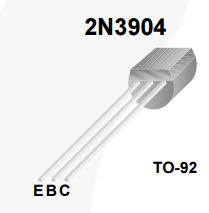
NPN: 2N3904
PNP: 2N3906

Semiconductor Make-up:
"Cartoon" Diagram showing doping regions
Simplified silicon cross-section


Schematic Symbols:

NPN: BJT NPN symbol (case)
   
PNP: BJT PNP symbol (case)

B: Base
C: Collector
E: Emitter

Collector/Emitter is in reference to electron emissions/collection. Remember positive current convention is "hole" flow, opposite to electron flow.

It can be helpful to remember that the arrow in the symbol is indicating the intrinsic diode


TO-92 Pinout:

Usually the same between models (also between NPN/PNP) but check your datasheet


Large Signal Model:
BJTs are current amplifying devices.
As seen in the large signal model below (NPN style - for PNP just flip everything), two electrodes (Base-Emitter) effectively act as a diode, while the other electrode (Collector) sinks current proportional to the Base-Emitter multiplied by a device-specific parameter Beta ($\beta$) (generally has a value ~200), also referred to as $h_{FE}$ the forward current transfer ratio. 

$\beta$ is specified on the datasheet and is lower in PNP devices than NPN.
The emitter current is the sum of the base-emitter diode current 

This predictable behavior makes BJTs convenient to use, understand, and analyze.


When analyzing a circuit with a BJT in forward-active mode, the two rules of thumb to remember are:
1) The device will try to maintain $V_{BE}$ at the PN junction diode forward potential (~0.7V)
2) The device will try to maintain $i_C=\beta *i_B$

In many cases the base current contribution to the emitter current can be ignored as a simplifying assumption (high $\beta$ means $I_E \approx I_C \gg I_B$ overwhelms the base contribution)


A BJT transistor with forward-biased $V_{BE}$ can only drive $V_{CE}$ so low, a condition referred to as saturation (not to be confused with the MOSFET saturation condition).

From a switching speed perspective, driving a BJT into saturation (low $V_{CE}$) can make "releasing" the switch (interrupting conduction) take a significantly longer amount of time - this is referred to as BJT "storage time" as charge carriers that build up in the base in saturation must be removed to allow the depletion region to form and cut off conduction.

This effect can be prevented by avoiding driving the transistor into saturation.
A clever circuit to "automatically" prevent this effect is the "baker clamp."
A simple implementation is to use a Shottky diode with low forward voltage drop with anode on the base and cathode on the collector - this holds $V_C$ within ~0.3V of $V_{B}$, which means $V_{CE}>0.4V$ which is sufficiently higher than typical saturation voltages $V_{CE(sat)} \approx 0.2V$.


Sunday, June 7, 2015

Friday, May 29, 2015

Connector Terminology

Connector gender (Male/Female) for electrical connectors is determined by convention for the given connector, but as expected, the one with the pointier bits compared to it's mating partner is usually designated the male gender.

Jacks, Sockets, Plugs, etc. however, can get a little more complicated.
The terms Jack, Plug, and Socket interpreted in accordance with ASME Y14.44 Reference Designations for Electrical and Electronics Parts and Equipment (plus my own opinion on some others):
  • Jack: A jack is the fixed (or less-movable) connector in a pair, regardless of whether the connector is male/female gender. Reference designator "J" is used in schematic diagrams.
  • Plug: A plug is the moving component of a connector pair, regardless of gender. Reference designator "P" is used. If there are two moving parts such as cables that plug into each other, BOTH connectors can be designated "plugs". Said another way, the plug is the thing you hold in your hand, the jack is the thing you plug into.
  • Socket: Sockets are generally fixed connectors that are used to mount & connect a device or printed circuit directly. Reference designator "X" is used, usually followed by the reference designator of the device it is intended to accept (see the ASME standard for rules for special cases). The distinction between a socket and a jack is that usually jacks are for mating with connectors whereas sockets accept a device package or structure directly (think light-bulb socket which mates directly with the device).
  • Receptacle: Generic term for the electrical contact zone of a female gendered connector - the receiver of a male electrical contact "pin". When describing the number of electrical contacts on a connector, I usually use "N-position pin/receptacle connector."  Sometimes "socket" is used to refer to the individual receptacles.
  • Outlet: Usually used where you have a point where power is being "let out." It is a good idea for power outlets, whether they be jacks or plugs, to be female gendered (having a recessed receptacle) to prevent inadvertent contact with electrically energized surfaces.

Some examples after the break

Thursday, May 21, 2015

Surface Mount Packages Explained

PART 1: Discreet Devices

Surface-mount technology (SMT) discreet devices such as resistors, capacitors, etc. commonly use a four-digit package code such as 0402, 0603, 1206 to indicate their size on datasheets & for ordering. 


SMD capacitor

The two pairs of digits may represent the English units OR MAY represent the rounded unit in tens of mil (milli-inch) for a metric component!

e.g. 0603 may be describing


[06]     [03]
.06"   x .03" 
length   width

when the actual dimensions are 1.6mm x 0.8mm which is .0630" x .0315"


A metric version specification of the same would be 1608M where the pairs of digits represent the number of tenths of a mm. In the US, English style (milli-inches) units is far more prevalent and usually assumed. Always refer to a manufacturer's datasheet for actual device dimensions & tolerances.


Topline has a handly conversion page if you want to know the actual dimensions that correspond to the rounded English-unit description code. 


PART 2: ICs


Z84C0010FEC LQFP


Have you seen the terms SOIC, TSOP, SOT23, PLCC, QFP and other alphabet soup in reference to surface mount integrated circuit packages and have trouble keeping them straight? Topline to the rescue again - their SMT nomenclature guide is a nice reference. It describes most surface mount package types for ICs.

Monday, May 18, 2015

LTspice Parameter Stepping Example

LTspice is an excellent SPICE circuit simulation and modeling tool provided free by Linear Technology.

One of the nice features that LTspice provides is the ability to drop SPICE simulation commands right onto your schematic as text - the image after the text illustrates two extremely useful commands: .MEASURE and .STEP

.MEASURE allows you to shortcut the process of using the waveform viewer to painstakingly trace along a waveform for the value you want. The command lets you evaluate a user-customizable expression - key when you want to evaluate the same parameter for a variety of simulation conditions - and will even prepare a table of results if you automate the conditions with .STEP. To see the results (or error messages for malformed commands  ) in LTspice, after simulation open the "SPICE Error Log" (or keyboard shortcut CTRL-L).

LTspice Wiki (unofficial) is a great LTspice resource and includes documentation for the .MEASURE syntax copied from the in-program help (see link for more details):  

Syntax: .MEAS[SURE] [AC|DC|OP|TRAN|TF|NOISE] <name>
 + [<FIND|DERIV|PARAM> <expr>]
 + [WHEN <expr> | AT=<expr>]]
 + [TD=<val1>] [<RISE|FALL|CROSS>=[<count1>|LAST]]

.STEP allows you to automate multiple simulations across a parameter. You can define a generic parameter using .PARAM <name> which can be used as a component value by de-referencing it using {name} and then calculate multiple simulation results/waveforms by sweeping or stepping the parameter. Other things you can "step" include temperature (to look at the temperature effect on your circuit) via parameter temp, model parameters such as transistor width or on-resistance, and even entire part models/subcircuits!

The syntax for .STEP is a little confusing so check out the LT Wiki copy of the in-program help for some examples - 

Syntax: .STEP [OCT|DEC] [<model>|PARAM] <parameter>|<source instance> [LIST] <<start value> <stop value> <steps>>|<list of values>

SPICE commands are activated in LTspice by placing them using the .op tool onto the schematic (Keyboard shortcut 'S').

Below is an example schematic with commands and resulting table of values in the SPICE Error Log. Two different parameters are stepped - temperature and load resistance - and the peak-to-peak difference across the temperature range as well as the average operating point across the temperature range is displayed in the error log. The step numbers correspond to the order specified in the command.